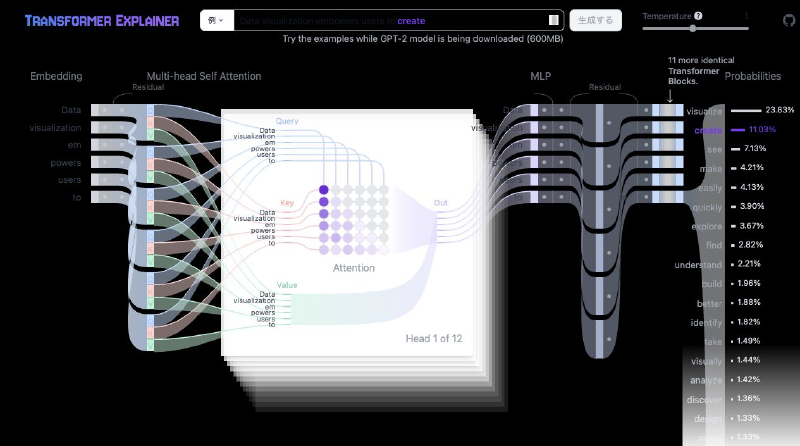
Transformer Explainer is an interactive visualization tool for following the internal processing of a text generation model token by token. You can see how input text is tokenized, embedded, combined with position information, processed through attention and feed-forward layers, and used to predict the next token.
By looking at self-attention weights and intermediate representations, you can observe how a Transformer refers to context. It is a useful learning tool for understanding the foundation of large language models as an actual text generation process, not only through formulas or implementation details.
What you’ll learn
- The overall picture of how a text-generation model like GPT-2 predicts the next word from an input sentence
- How self-attention computes “which word attends to which” using three vectors — Query, Key, and Value
- How changing the temperature parameter shifts model output between “predictable” and “diverse”
Walkthrough
Follow the pipeline from left to right while trying the input box and the Temperature slider in the top right.
- Change the input text: Type any English sentence into the box at the top, or pick one from the “Example” dropdown, then click “Generate.” A real GPT-2 (small) model running in your browser recomputes the prediction for what comes next.
- Embedding (leftmost column): See each word in the input turn into a numeric vector representing its meaning.
- Multi-head Self Attention: Each word is turned into three vectors — Query, Key, and Value — and the grid of circles (the attention matrix) shows how much each word attends to every other word. The “Head n of 12” label tells you which of the 12 attention heads you’re looking at; each head captures a different kind of relationship between words.
- MLP and residual connections: The attention output passes through an MLP (feed-forward) layer and a residual connection before moving to the next Transformer block.
- 12 stacked Transformer blocks: The same block structure repeats 12 times in total (“11 more identical Transformer Blocks”), processing word relationships at increasingly abstract levels.
- Probabilities (rightmost column): The model’s candidate next words are shown as bars, ranked by probability.
- Move the Temperature slider: Raise it and click “Generate” again — the probability distribution flattens out, so less likely words get picked more often. Lower it, and the prediction concentrates on the single highest-probability word.
Background
The Transformer architecture itself was introduced in the 2017 paper “Attention Is All You Need” by Vaswani et al. What this explainer visualizes is GPT-2 (the small model, about 124M parameters), released by OpenAI in 2019.
The tool itself was published in 2024 by Georgia Tech’s Polo Club — the same research group behind CNN Explainer and GAN Lab — as the paper “Transformer Explainer: Interactive Learning of Text-Generative Models” (IEEE VIS 2024). Temperature is the parameter of the softmax function that converts the model’s raw scores into a probability distribution: raising it flattens the distribution, and lowering it concentrates output on the single highest-scoring token.
Takeaways
- A Transformer predicts the next word by repeatedly computing word-to-word relationships with self-attention and transforming them with an MLP, layer after layer
- Each of the 12 attention heads captures a different kind of relationship between words
- Adjusting temperature lets you directly feel the trade-off between “predictability” and “diversity” in a model’s output
